
Foundations Division
CortexForge
Building secure digital foundations that simplify how organizations work and share information.
Built for Every Sector
From classrooms to congregations to community hubs — we build systems that bring people and purpose together.
Transportation
Systems designed to coordinate across routes and operations.
Property Management
Systems built to hold order across places, assets, and risk.
Manufacturing
Systems built for the people who build everything else.
Websites
Beautiful, secure portals that make sharing information simple and staying connected effortless.
Explore options and pricing at your own pace.
For media or speaking inquiries, contact [email protected]
Explore other divisions of Cortex Forge Consulting Inc.
🚛 Transportation Intellignce
WayMark
Keeps vehicles, routes, inspections, and time records in one clear place — so the truth doesn’t split across paper logs, scattered apps, or after-the-fact fixes. Everything stays tied to the unit, tied to the moment, and readable by anyone who needs to act on it.
Explore the layers
Operator
The assigned unit stays visible, inspections stay fast, and duty/rest time stays clear without extra steps. Notes can stay simple. Deficiencies get flagged early. The record stays honest.
Mechanic
Inspection history arrives intact — markings, notes, and context carried forward instead of re-explained. Diagnosis starts grounded. Repairs become documented decisions. Return-to-service becomes provable.

Owner
Fleet readiness becomes obvious without live watching. Assignment, inspection cadence, and service condition stay visible across units so gaps surface early and accountability holds when it matters.
Screens shown are illustrative views from demonstration systems.
WayMark
Operator
The assigned unit stays front and center so the driver always knows they’re logging against the right vehicle. Inspections, duty status, and route context are captured in seconds — with the system handling time and location automatically. The goal is simple: report what’s real, stay on track, and keep small deficiencies from turning into bigger problems.
Right Now
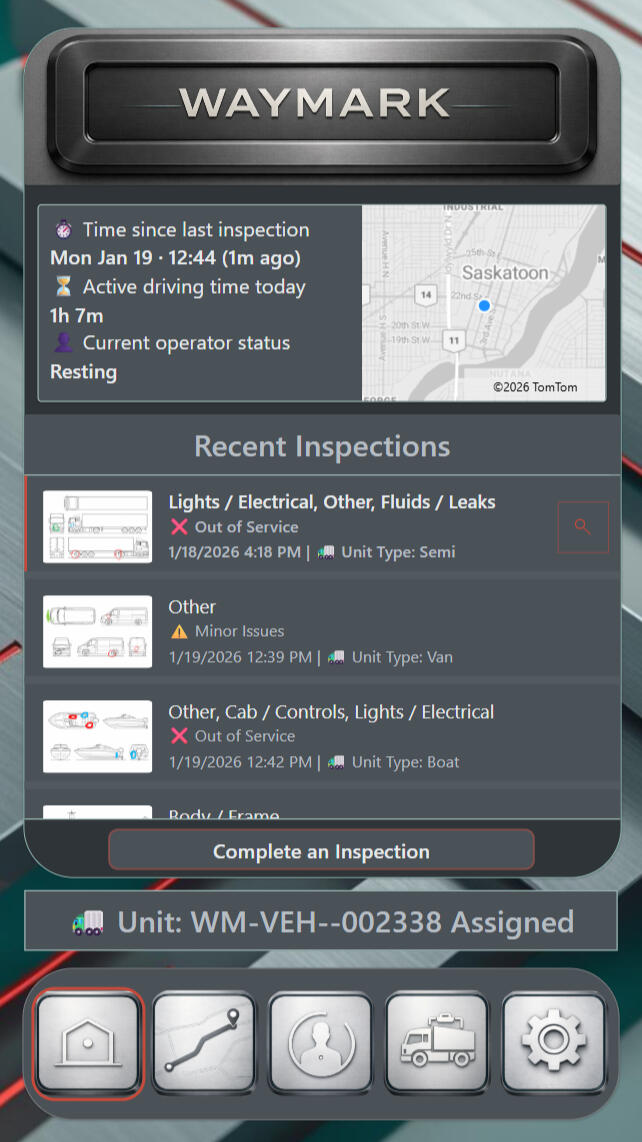
Vehicle Status
Everything that matters about the assigned unit lives here in one calm snapshot. Inspection timing, active driving time, and the operator’s current state stay visible so nothing gets missed or misread. Recent inspections remain close at hand, making service condition obvious before the next decision is made.
Next Stops
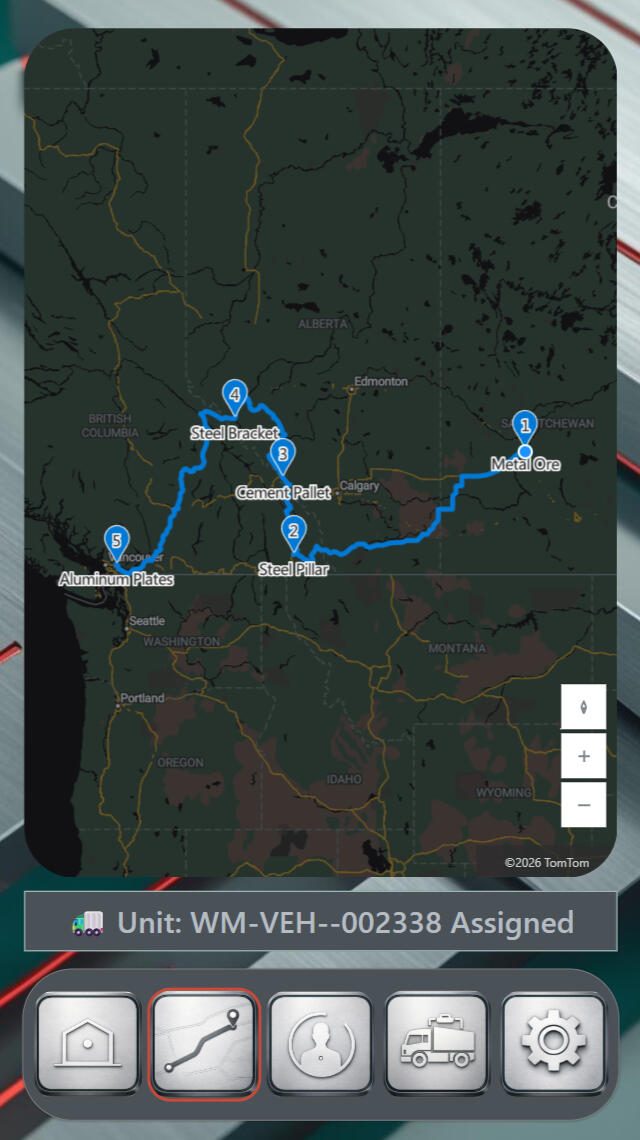
Route View
The route is drawn as a sequence, not a guess. Numbered stops keep the order clear, so the trip reads the same way for drivers, dispatch, and leadership. Cargo labels add meaning to each stop, turning the map into a work plan instead of a moving dot.
Time History
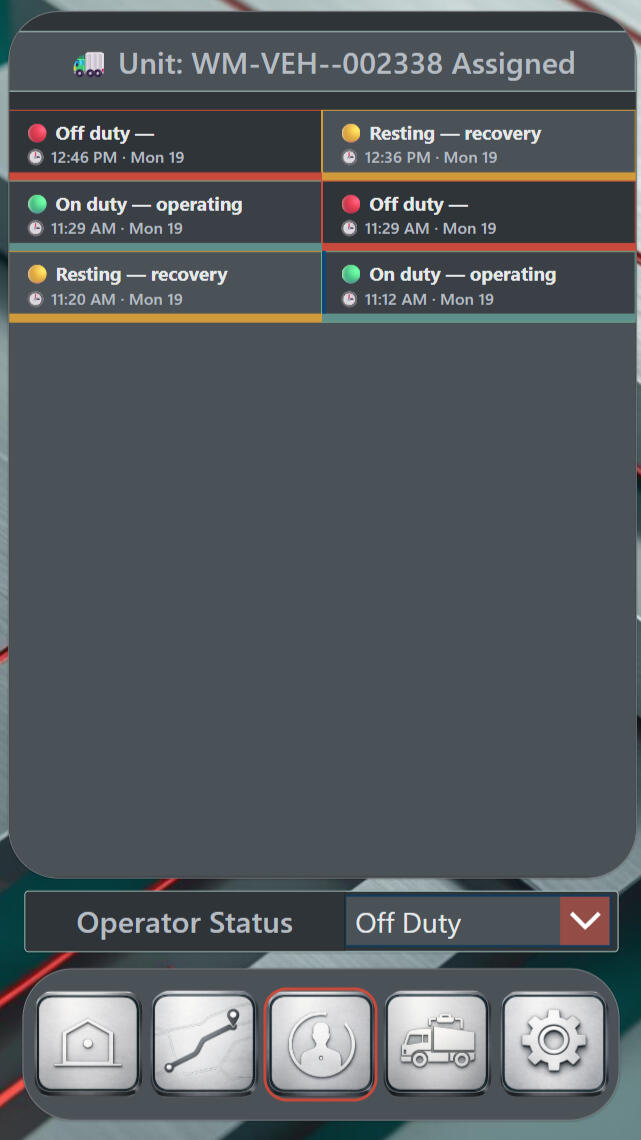
Duty Timeline
Status changes don’t disappear here — they stack in order. On duty, off duty, and resting entries remain time-stamped so the day can be reconstructed without backfilling, guessing, or debate. The dropdown at the bottom updates the current state, while the timeline preserves the truth behind it.
What Happened
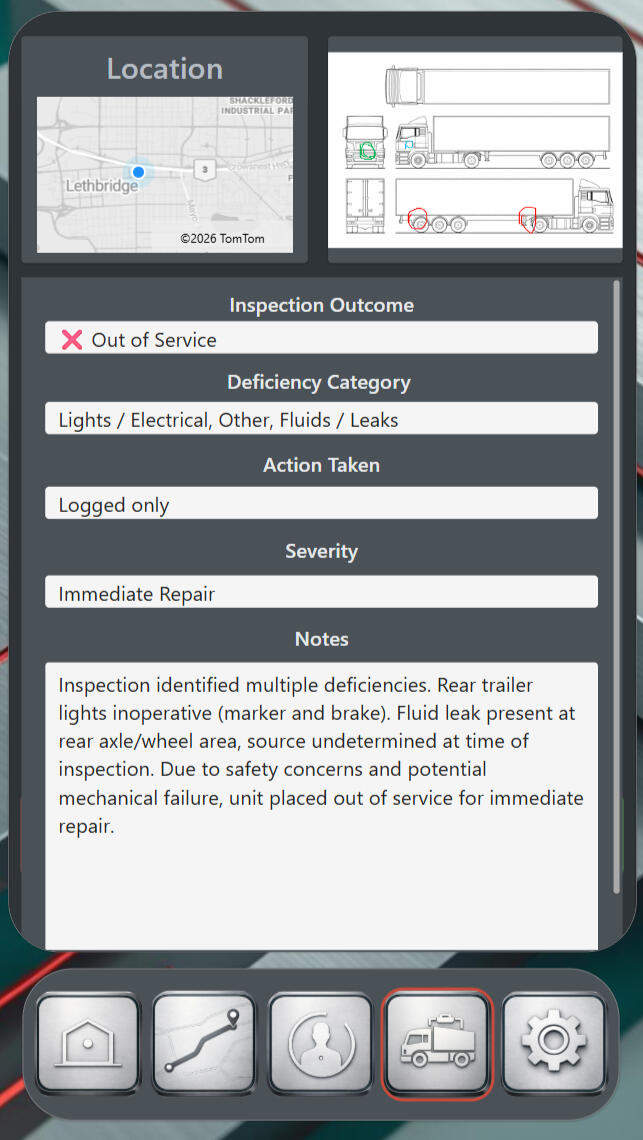
Inspection Record
An inspection becomes a permanent entry here — outcome, category, severity, and action captured together in one record. Location and diagram markings anchor the deficiency to a real moment in the field, while notes preserve the operator’s words without forcing a formal report. When a unit is taken out of service, the reason stays undeniable.
Point It Out
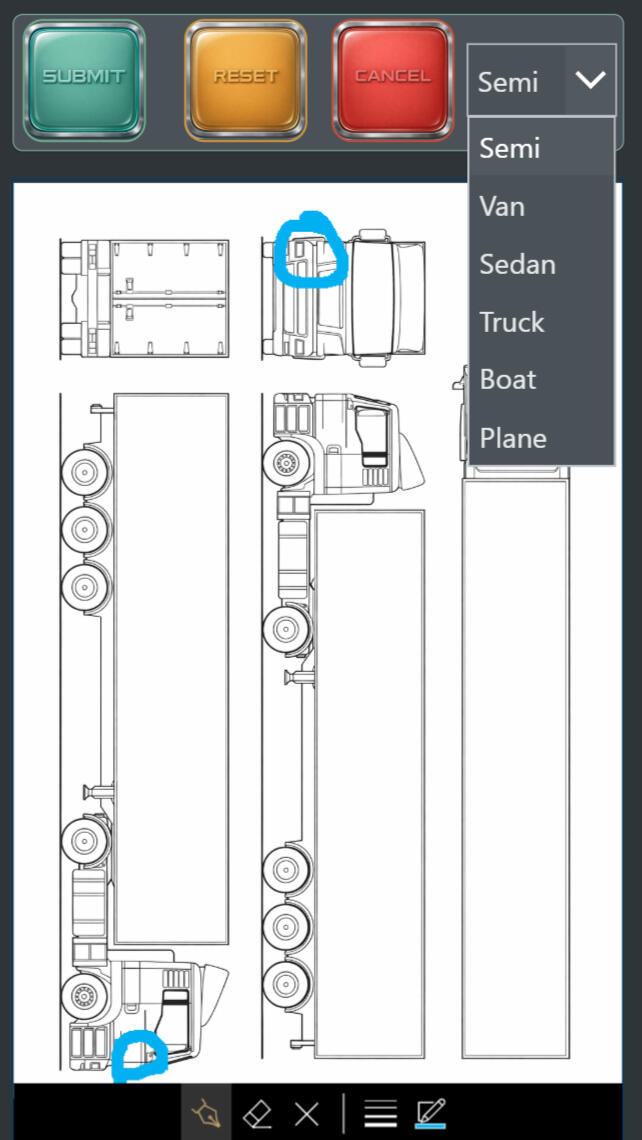
Inspection Markup
Instead of hunting for the right words, the operator marks the exact spot on the unit diagram. The unit type selector keeps the drawing accurate across trucks, vans, boats, planes, and more. The result is simple: location becomes visible, and the deficiency becomes clear without a paragraph.

Material Intelligence
Redline Carbon Frame
Carbon fiber discipline and matte graphite form a chassis that feels engineered, not fragile. A razor-thin red seam defines the boundary between normal and urgent, so priority becomes visible without noise. The whole surface reads like controlled speed — clean, sharp, and intentional.
The result is restraint + urgency — giving interfaces seriousness, pace, and decision-ready focus.
WayMark
Mechanic
Everything reported in the field arrives here intact — markings, notes, history, and inspection outcomes carried forward without being rewritten. This section turns frontline observations into confirmed findings, documented repairs, and clear service decisions. It keeps the handoff clean: what was noticed, what was verified, and what changed.
Site Readiness
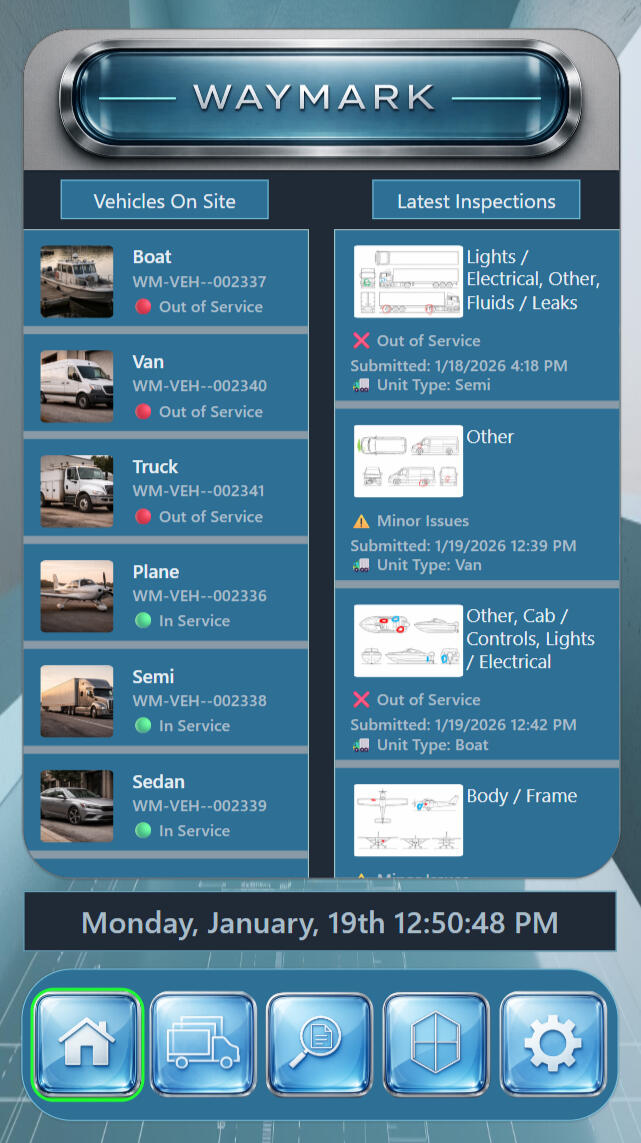
Operations Overview
Vehicles on site are listed with clear service condition so availability is obvious instantly. The inspection feed beside it adds the “why,” connecting each unit’s status to the most recent findings and submission time. Together, the page reads like a quick readiness briefing: what’s ready, what’s down, and what changed.
Repair Proof
Mechanic Report
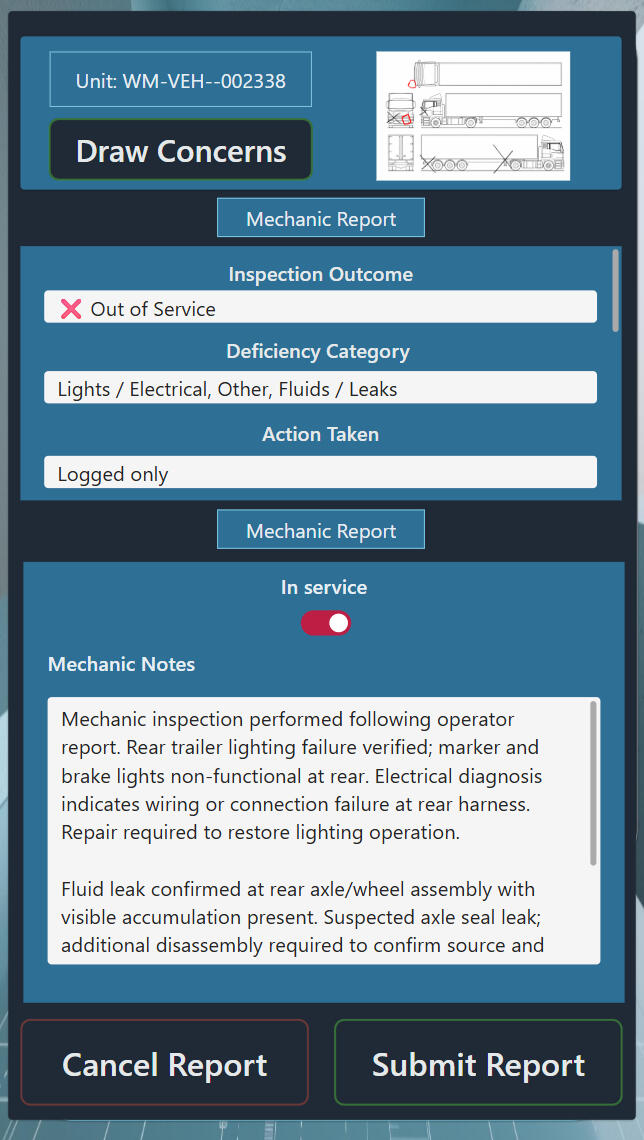
Field observation becomes maintenance confirmation here. The original inspection context remains visible, while the mechanic adds findings that stand on their own — what failed, what was verified, and what must be corrected. The in-service switch carries weight: it’s the moment the unit’s service condition is officially decided.
Compare Notes
Markup Review
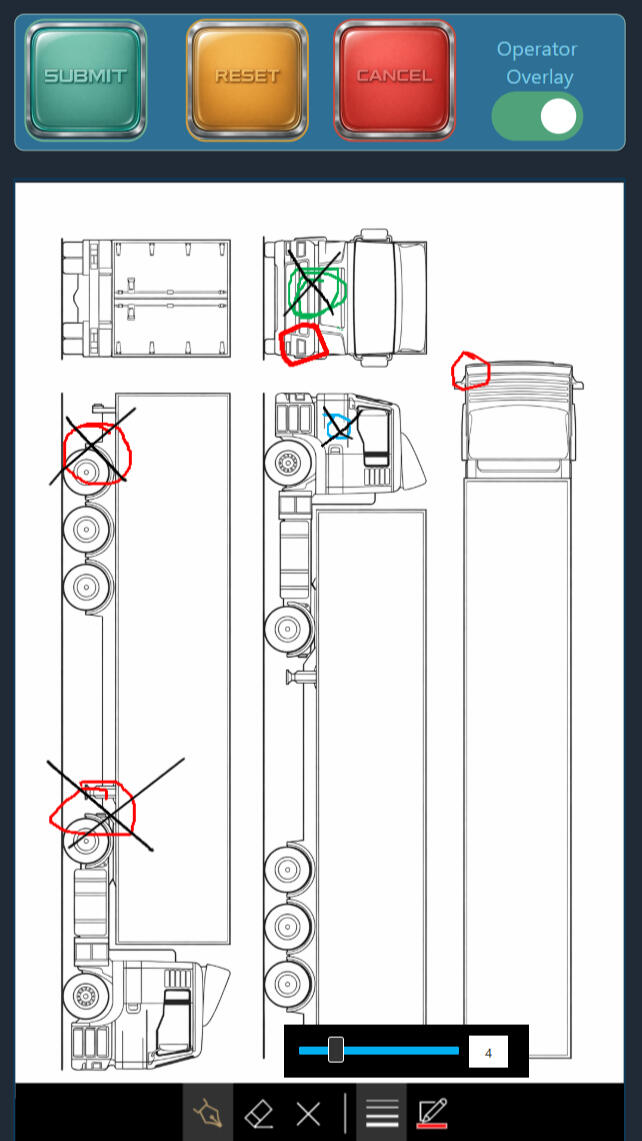
Two realities sit on the same diagram: what the operator marked in the field, and what the mechanic confirmed during follow-up. The overlay toggle lets either layer appear or disappear without erasing anything. That separation protects the chain of truth — observation stays intact, confirmation stays intact, and the handoff stays clean.
Material Intelligence
Strata Ledger Frame
Stacked glass planes separate information the way real operations separate responsibility — clean, spaced, and readable. Light moves through each layer like an audit trail you can trust, not a screen you have to decode. Subtle blueprint lines beneath the surface add structure without clutter, keeping the mood calm and precise.
The result is transparency + separation — giving systems clarity, order, and defensible truth.
WayMark
Owner
This section keeps fleet readiness visible without chasing updates or hovering over operators. Assignment, inspection cadence, service condition, and route movement stay organized so gaps surface early and decisions stay defensible later. When questions come up, the timeline holds — and the truth is already there.
14-Day Pulse
Fleet Health
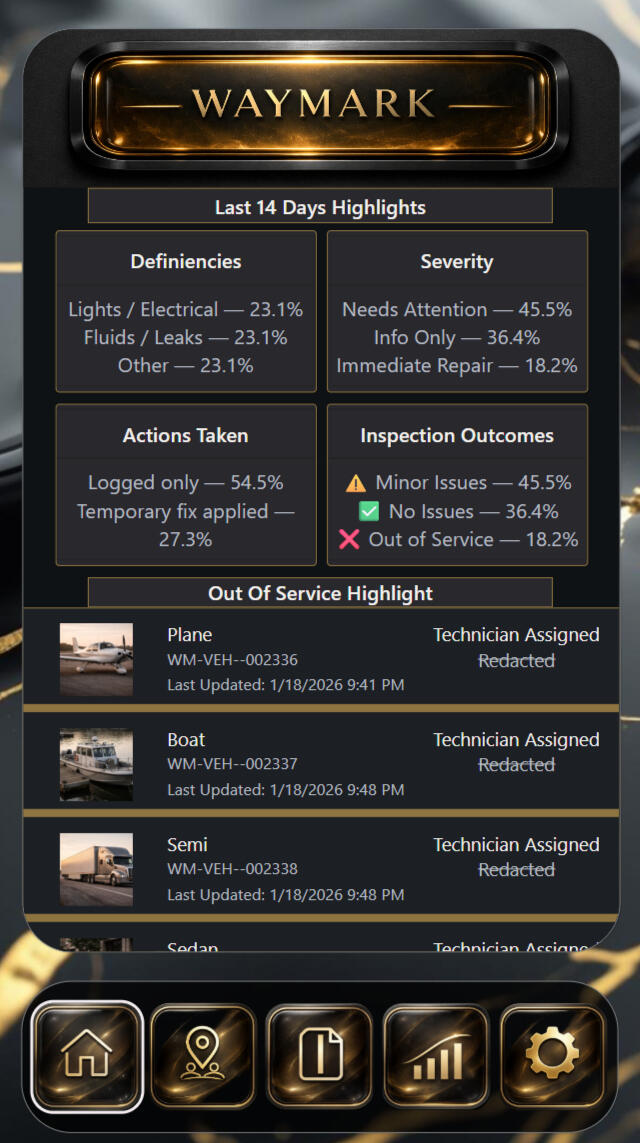
Instead of reading inspections one at a time, this page exposes patterns across the last two weeks. Deficiency types, severity levels, actions taken, and outcomes are summarized so trends surface fast. The out-of-service list below keeps the highest-impact units visible, including last update time and technician assignment.
Moving Now
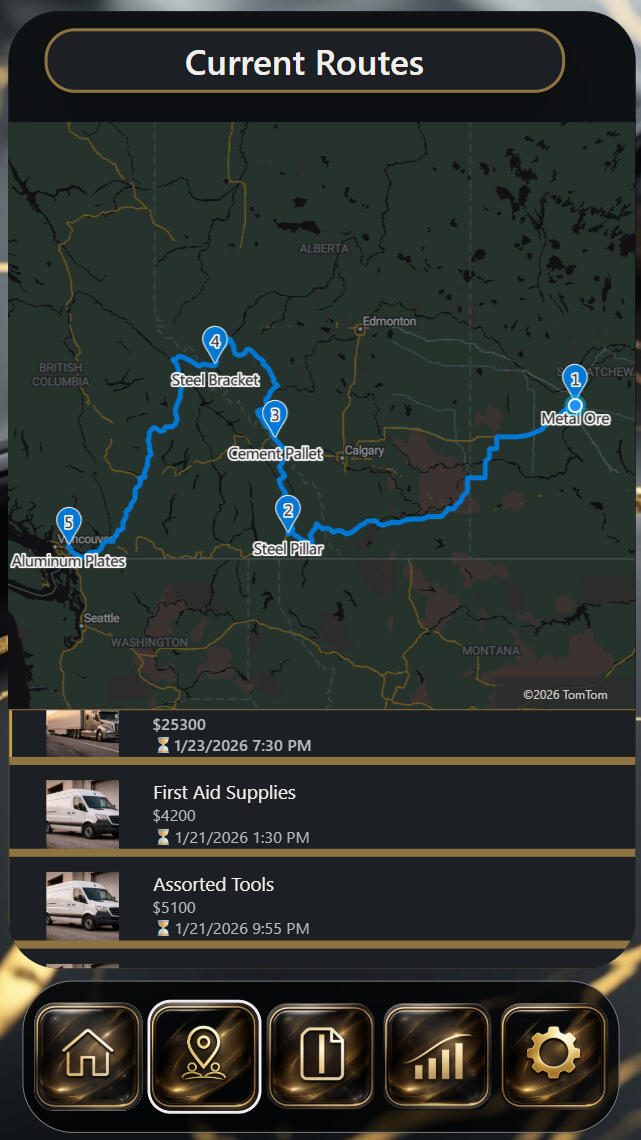
Current Routes
Active routes are tracked as work in motion. Stop order stays numbered so sequence can’t be misunderstood, and cargo labels give each stop purpose. The list underneath ties movement to real deliveries — including value and last update time — so priority becomes obvious without a phone call.
Full Story
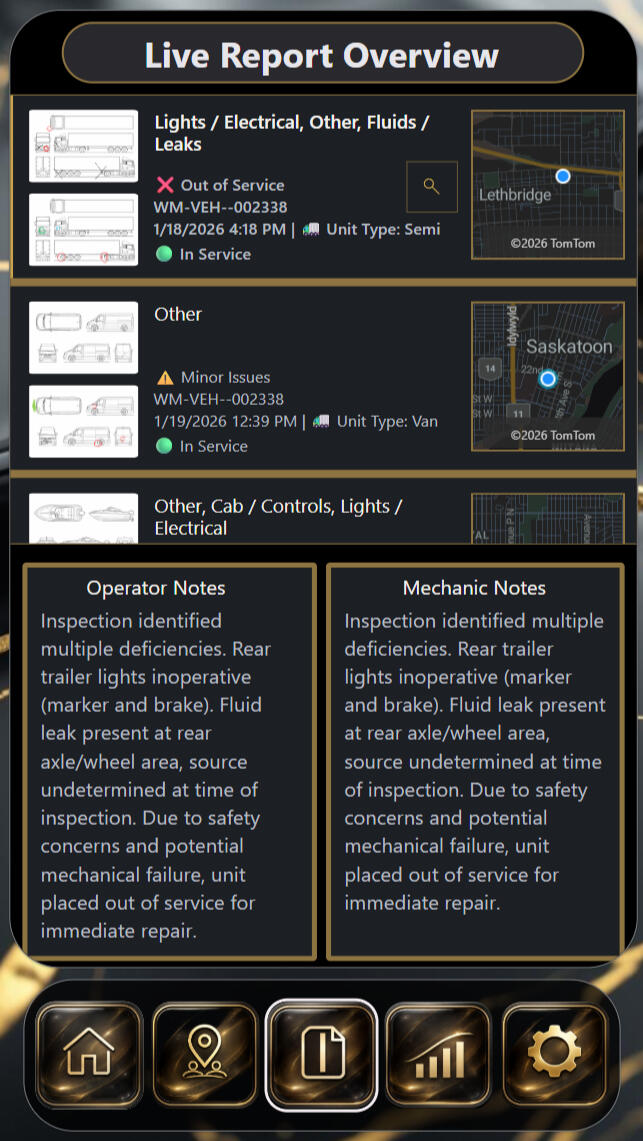
Live Reports
Reports stay connected here — diagram, unit status, and location held together in one continuous thread. Operator notes and mechanic notes sit side by side so context can’t be lost and timelines can’t be rewritten. The map thumbnails keep every record tied to a real place, making each decision traceable instead of arguable.
Shared Evidence
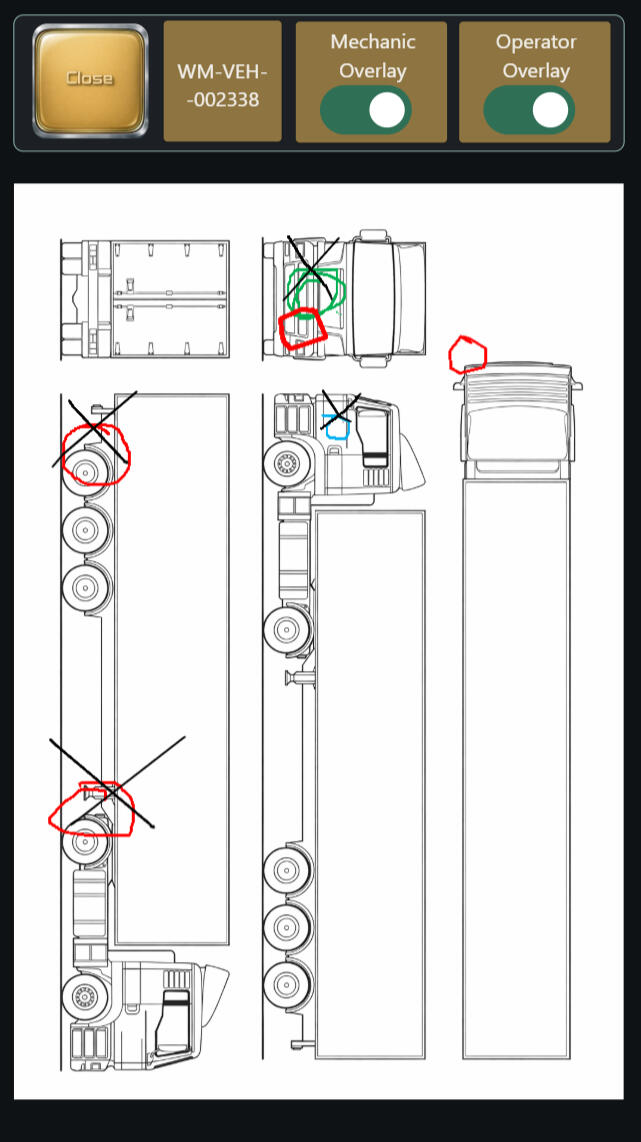
Annotation Review
Owner review demands both perspectives without distortion. Operator markings remain preserved. Mechanic confirmations remain preserved. With both overlays available, agreement becomes obvious and disagreement becomes visible — without turning notes into a debate. The diagram becomes a single piece of shared evidence that holds under pressure.
Material Intelligence
Auric Rift Frame
Obsidian motion holds the surface in quiet control, while a single molten seam cuts through like a verified fracture. The gold line isn’t decoration — it’s signal under pressure, marking the exact point attention must land. Together, they turn chaos into one readable truth without raising the nervous system.
The result is stillness + evidence — giving systems authority, focus, and accountability.

🏢 Property Intelligence
Citadel Matrix
Property management intelligence that brings buildings, tenants, and day-to-day operations into one clear system.
It centralizes location data, leases, contacts, floor plans, permits, and maintenance records — making it easier to see what’s happening across your properties and address issues before they escalate.
Property Portfolio Briefing
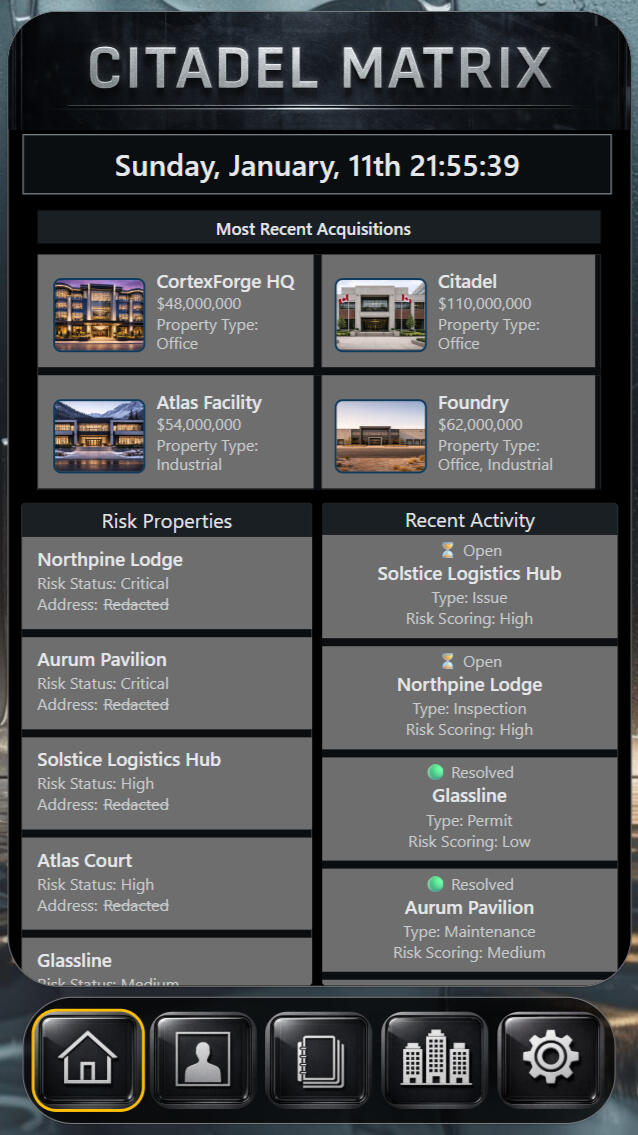
Daily Operations Snapshot
Citadel Matrix turns the current state of the property portfolio into one clear operational briefing — no digging through spreadsheets, emails, or disconnected systems.
You get recent acquisitions, high-risk properties, and active or resolved issues in a single view, with risk severity and status surfaced at a glance.It gives property and facilities teams a fast, reliable read on what’s stable, what’s escalating, and where attention is required right now — a live snapshot of portfolio health, delivered without friction.
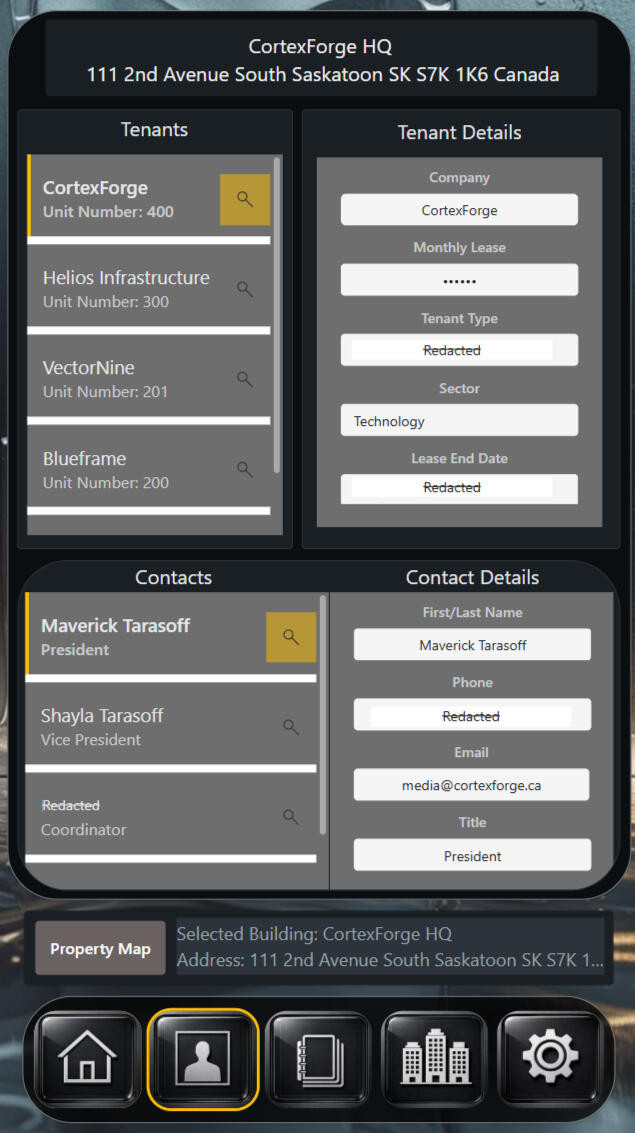
Tenant & Contact Records
Occupancy Details
Organize tenant and contact information at the building level — no separate lists, no disconnected records.
See who occupies each unit, key lease details, and the primary contacts tied to that space, all in one place.It’s the place teams go when clarity matters: confirming tenants, checking lease context, or finding the correct contact quickly — a practical working view for day-to-day property coordination.
Operational Documentation
Record Submission
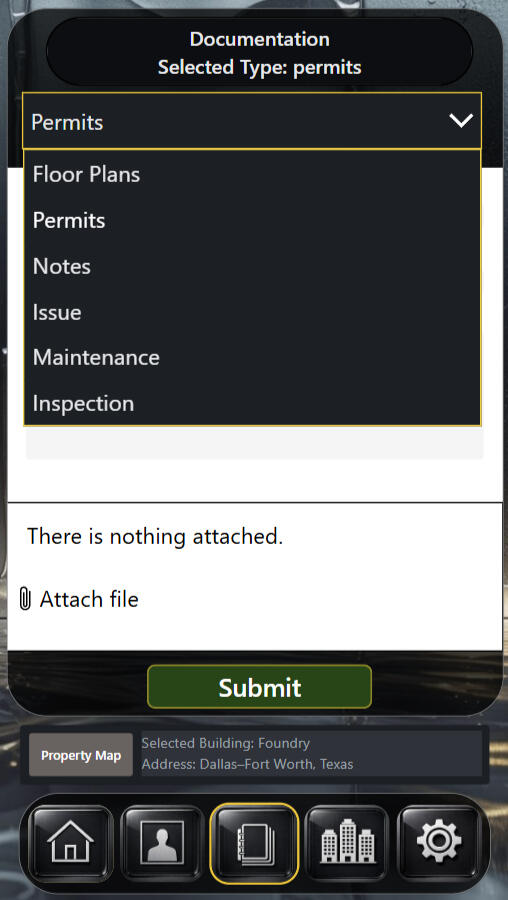
This is where real work becomes permanent record.
Permits, floor plans, inspections, maintenance, notes, and findings are captured in one place and bound to the selected building with attachments and context locked in at the moment of entry.Nothing floats in emails. Nothing gets lost in memory.
Action becomes documentation — clean, traceable, and ready when questions surface later.
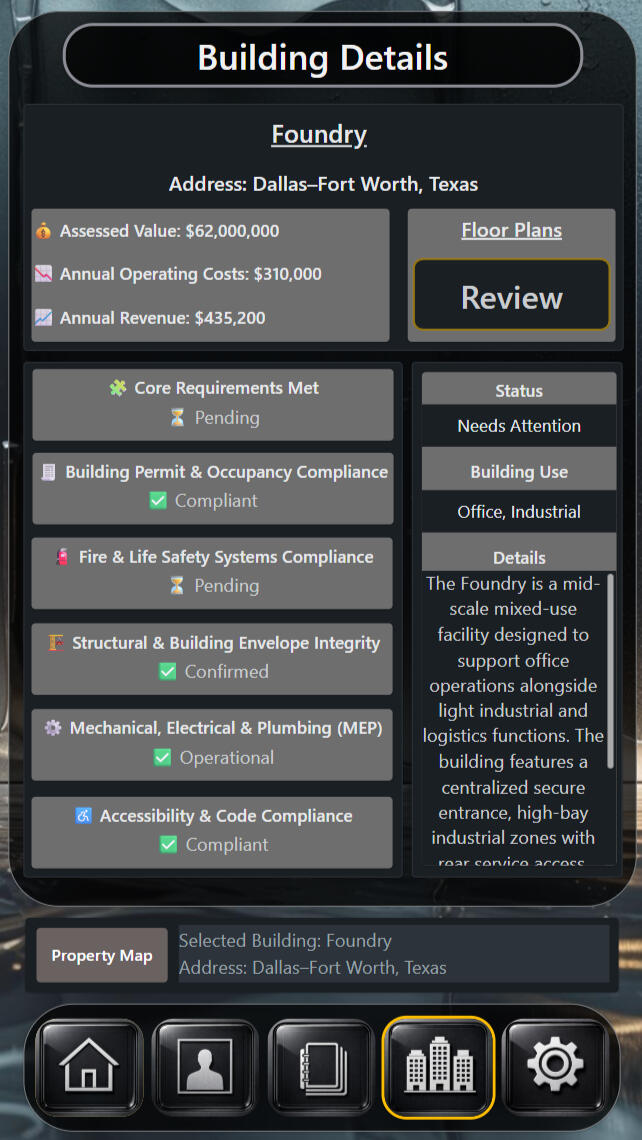
Building Condition & Compliance
Details Overview
A building’s standing is clarified here in plain terms.
Financial status, usage, compliance progress, and active flags are brought into one view so attention lands where it’s actually needed.The point isn’t more information —
it’s certainty.
Is this building in good standing… or is something holding it back?
Spatial Records
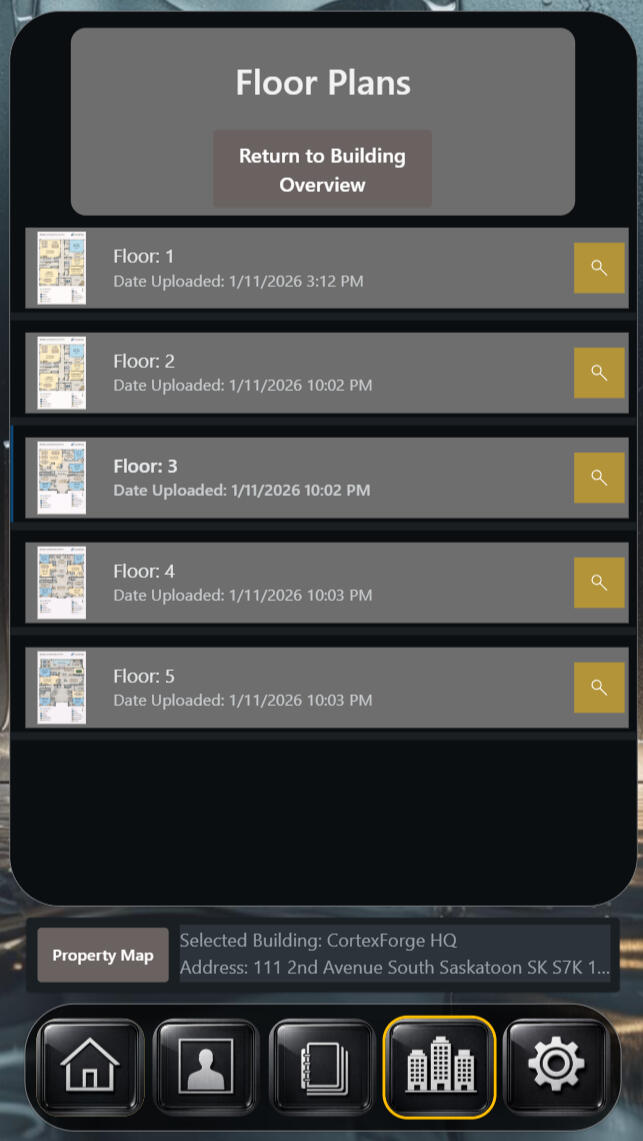
Floor Plans
Floor plans are stored here without clutter or commentary.
Each level appears once, with the most recent upload time visible before opening.No searching. No guessing.
Choose the floor. Open the layout. Move with confidence.
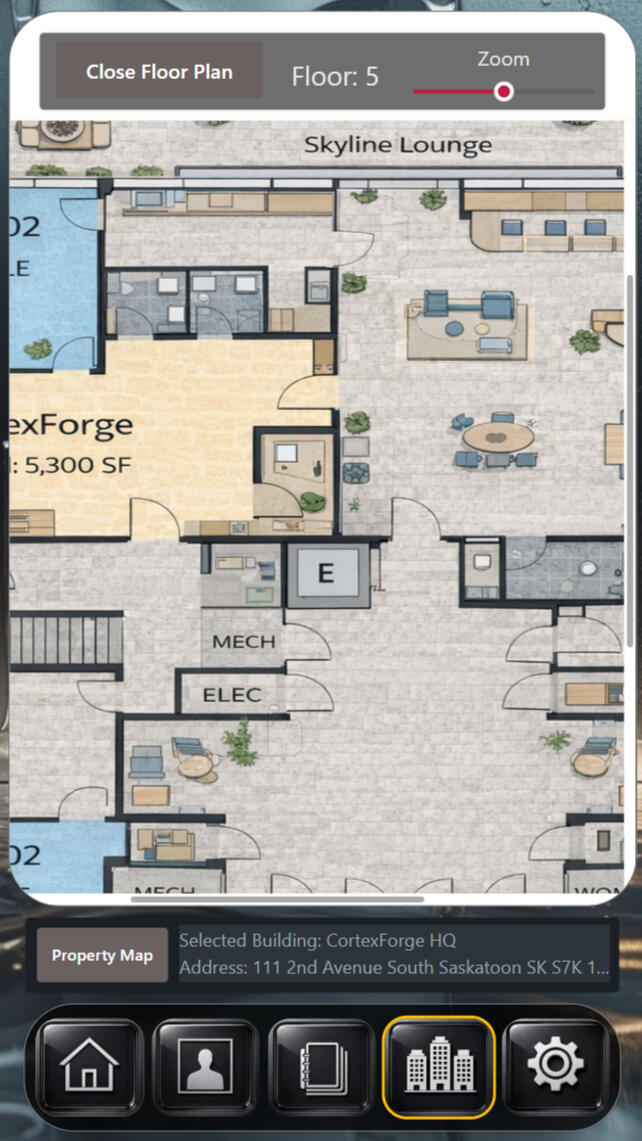
Dynamic Mobile Viewing
Active Floor View
This is the plan in full detail
built for movement.
Zoom and pan to confirm room layout, flow, and connections without relying on second-hand explanations.You’re here because you need spatial truth — where rooms sit, how areas connect, and what exists on this floor without guessing.
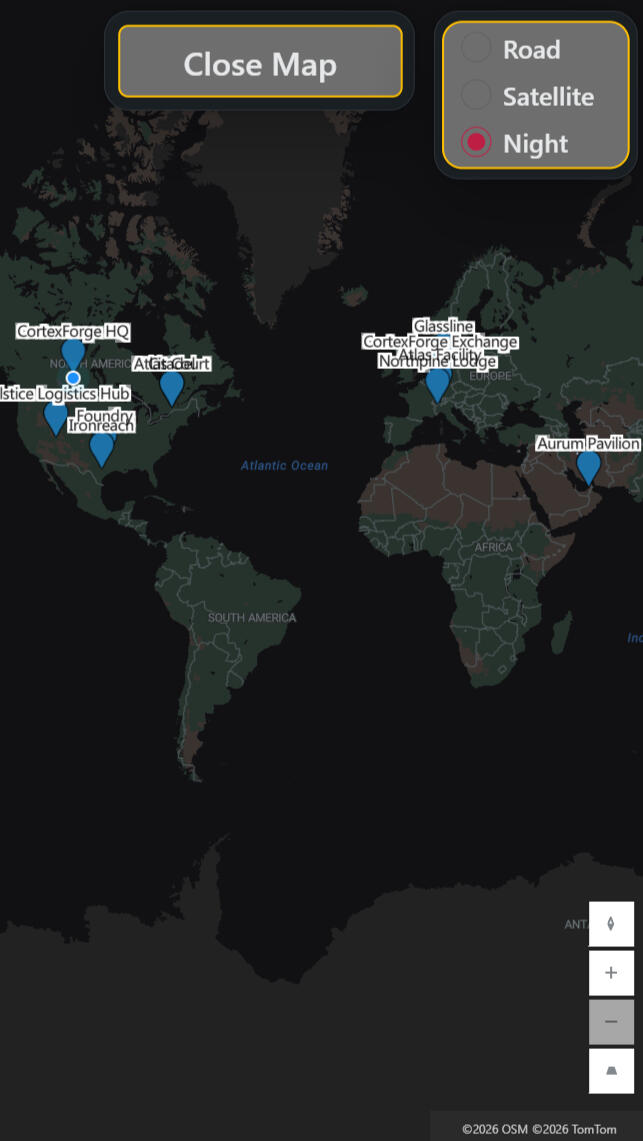
Location Context
Property Map
Every building is anchored to the real world here.
Location, surrounding area, and regional context are visible instantly, with map styles available for different levels of clarity.It removes the last kind of uncertainty a property team can’t afford:
Where is this place — actually?
Material Intelligence
Citadel Frame
The Citadel Frame blends forged steel structure with a deep, liquid-black motion surface. The hardened perimeter establishes boundary and authority, while the flowing interior introduces movement without volatility.The result is a fusion of structure + motion that gives operational systems weight, focus, and composure.
Screens shown are illustrative views from demonstration systems.
🛠️ Manufacturing Intelligence
ForgeLine
Real-time manufacturing intelligence — transforming QA activity, equipment tracking, and floor-level insights into a unified operational truth.
It highlights defects, trends, and production risks instantly, empowering leaders to maintain quality, reduce downtime, and keep the entire line moving with precision.
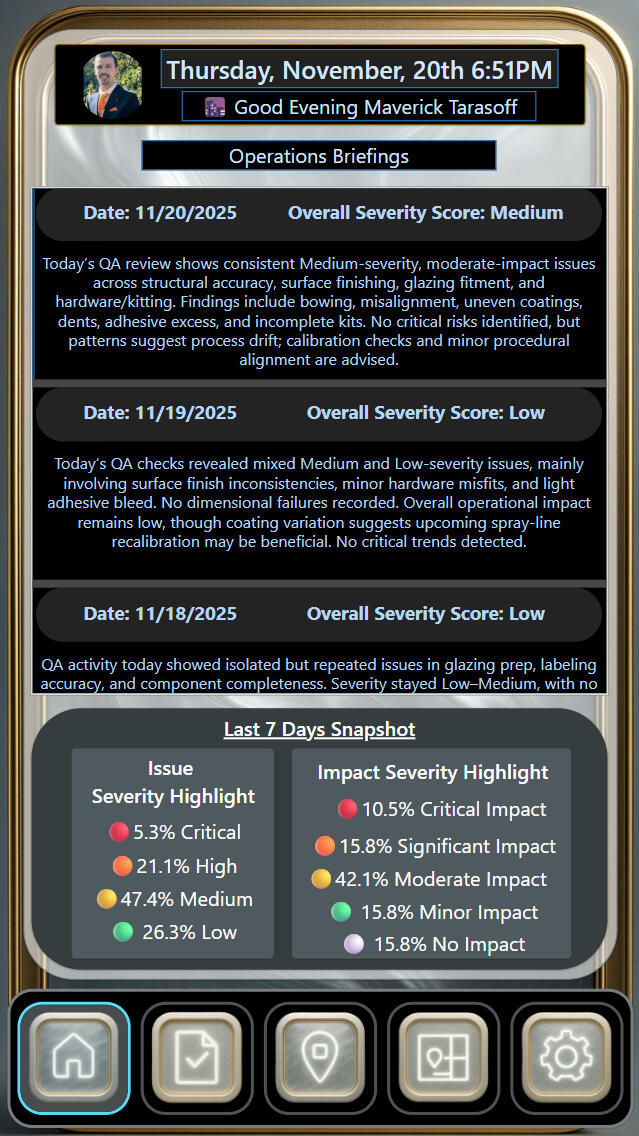
QA Summary Dashboard
Daily Operations Briefing
ForgeLine turns the last 24 hours of production activity into one clean operational briefing — no digging through messages, folders, or scattered notes.
You get the day’s key issues, severity insights, and the emerging trendline of the entire week at a glance.It gives supervisors and managers a fast, trustworthy read on what’s running smoothly, what’s slipping, and where attention will have the biggest impact —
a daily snapshot of the truth, delivered with zero friction.
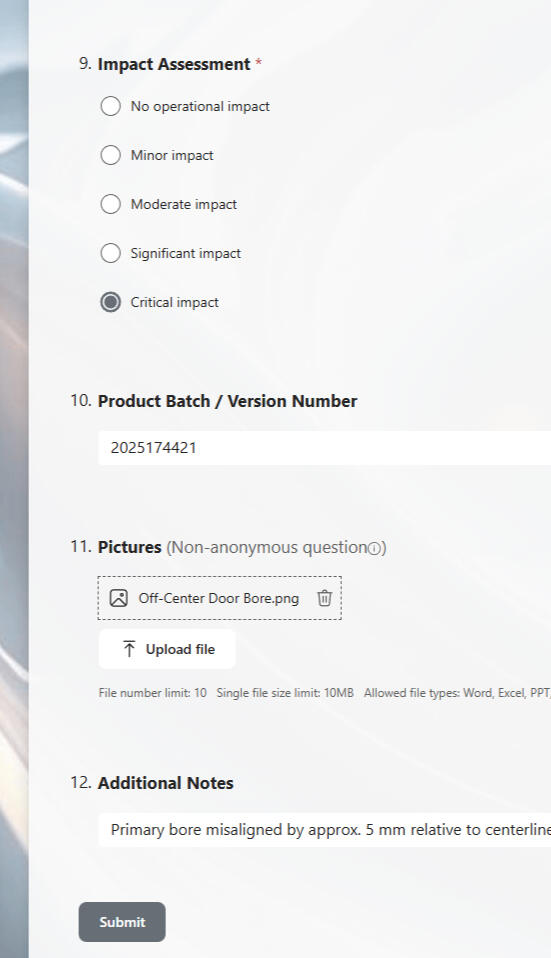
Reporting From the Floor
QA Intake Form
Operators can log issues in seconds — severity, batch number, photos, and notes all in one place.
Every report feeds straight into ForgeLine with no extra steps, giving supervisors clean, usable data the moment it’s submitted.
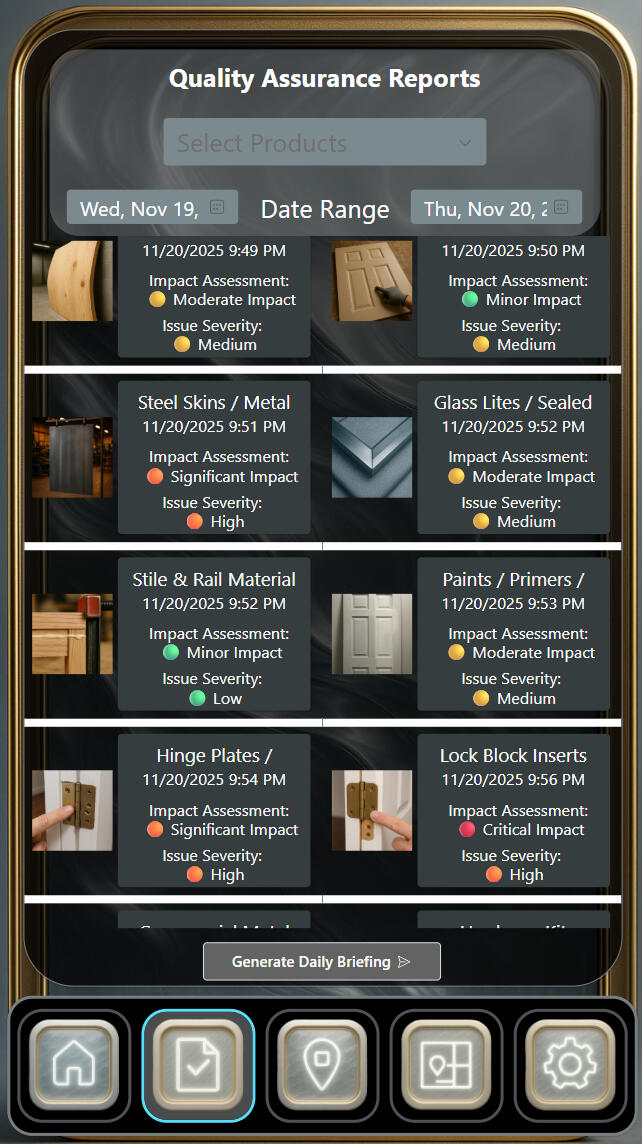
See Every Issue at a Glance
QA Reports Viewer
ForgeLine gives teams one clean place to review every QA finding from the day.
No scrolling through messages, no chasing photos, no scattered notes.Each product shows its impact level, issue severity, and the picture that proves the problem. Supervisors get instant clarity on what was flagged, what’s serious, and what needs attention next — without any guesswork.It keeps shift leads, managers, and floor teams aligned on the same truth.
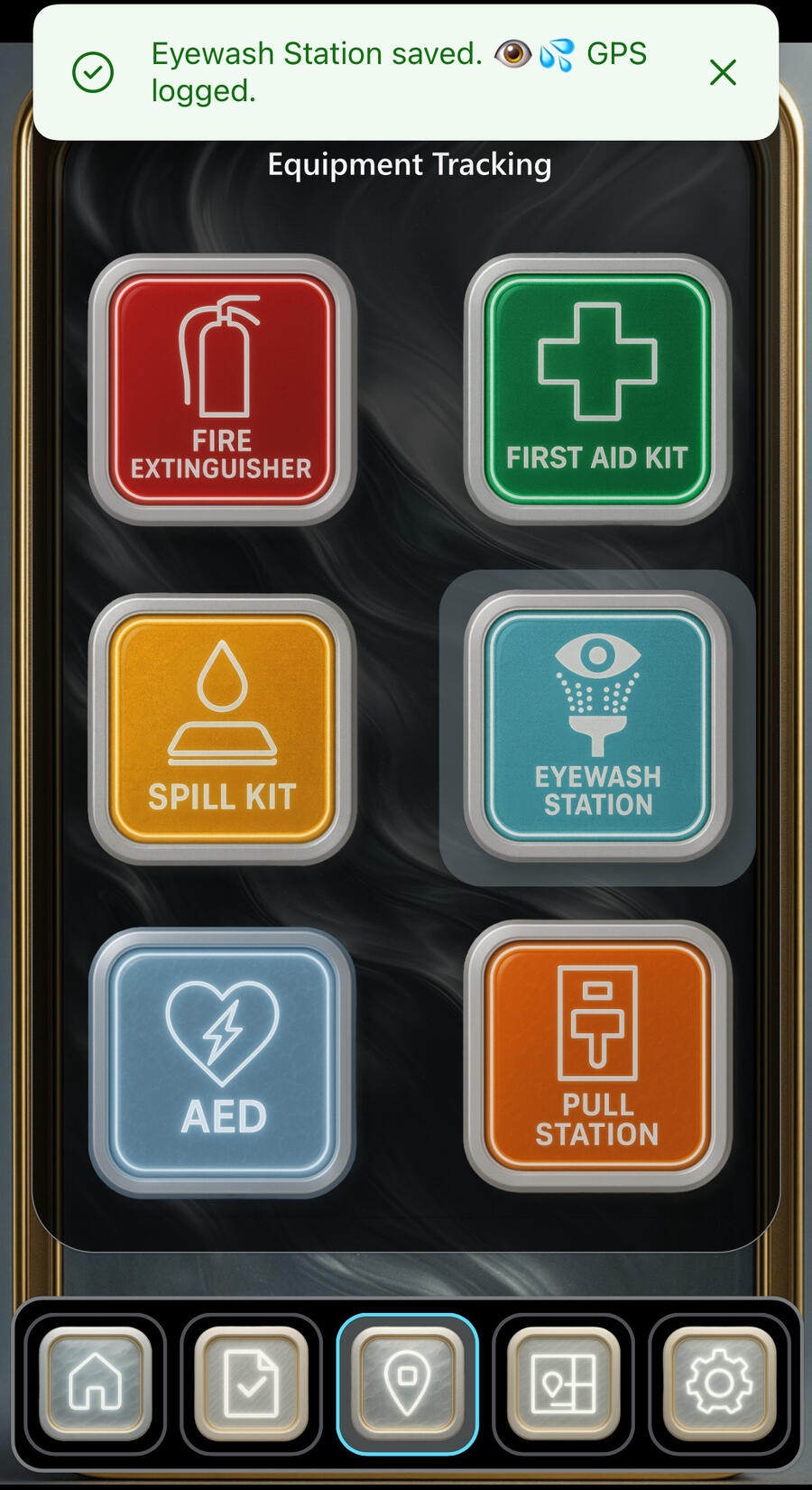
Instant Equipment Logging
Tap, Save, Logged.
ForgeLine makes safety checks effortless.
Just tap the item, stand beside it, and it’s logged — GPS included.No clipboards, no hunting for serials, no missed inspections.
Frontline teams get a fast, simple way to keep fire extinguishers, eyewash stations, spill kits, AEDs, and alarms up to date in seconds.It’s safety tracking built for real-world speed.
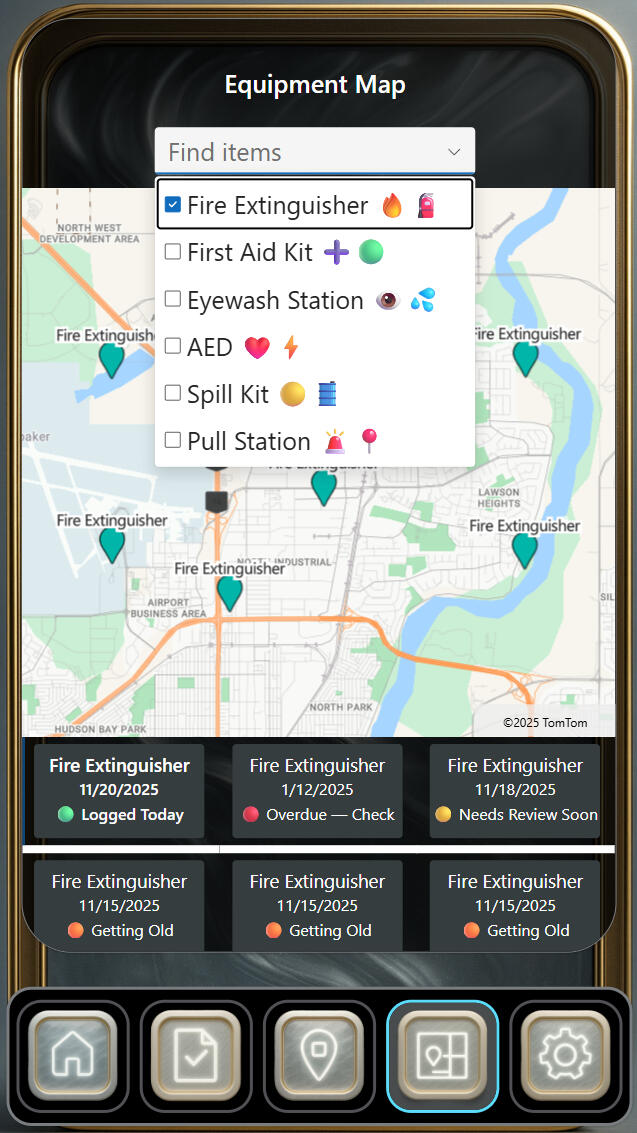
Live Equipment Locator
Find Safety Gear Instantly
ForgeLine’s Equipment Map shows every piece of safety gear on the floor — fire extinguishers, first-aid kits, eyewash stations, AEDs, spill kits, and pull stations.
You can filter by item, see what was checked today, and spot anything overdue or getting old.Supervisors get instant visibility.
Workers know exactly where to go.
And safety checks stop slipping through the cracks.
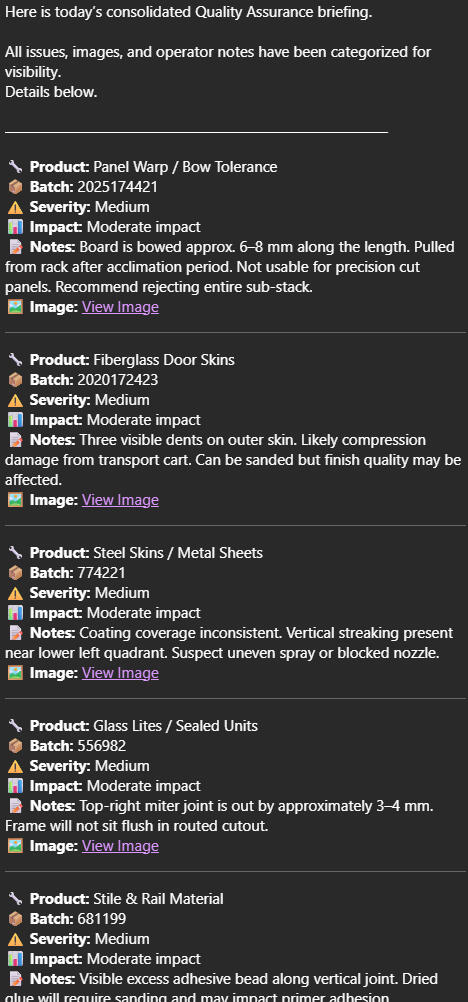
Straight to Your Inbox
Automated QA Email Briefing
ForgeLine can auto-generate a clean daily QA email that pulls product notes, images, batches, and severity levels into one easy-to-read summary.
No scrolling folders. No missing details.Supervisors get a consistent, reliable briefing that shows what was checked, what failed, and where attention is needed — all packaged in a format anyone on the floor or in the office can read in seconds.
Material Intelligence
Heritage Frame Series
The Heritage Frame Series blends classical metalwork with CortexForge’s modern motion-texture canvas.
The gilded frame anchors the design in permanence and craftsmanship, while the liquid-steel surface carries the signature kinetic look of the Imagination Division.The result is a fusion of heritage + motion that gives ideas weight, presence, and timeless identity.

Screens shown are illustrative views from demonstration systems.
🧠 Modern Classroom Communication
Tools for busy schools using what you already have — even if you have no time, budget, or tech team. Because fewer emails and better communication shouldn’t require more work.
The Everyday Challenge
Schools run on communication, but most days it feels like a flood.
Teachers send dozens of emails, principals try to track requests,
and parents only hear from the school when things get serious.
Everyone wants to stay connected — but the tools often slow them down instead of helping.
The CortexForge Approach
We build simple, ready-to-use digital tools that help your school stay organized
without adding new software or costs.
Everything runs on the technology your division already uses,
designed so that even the busiest teacher can use it in seconds.
✏️ How It Helps Teachers and Staff
Quick Classroom Reporting
Each classroom has a small QR code on the wall.
A teacher notices a broken chair or heating issue, scans the code, taps what’s wrong, and hits submit.
The right people — maintenance, administration, or office staff — are instantly notified.
No more chasing emails or wondering if anyone saw it.
Student Well-Being Reports
When a teacher is worried about a student, they can share that concern quietly and immediately.
They choose the student’s name, note what they’ve noticed,
and the school counsellor or administrator gets the
update right away.
It turns “I’ll remember to email later” into “it’s handled.”
Parent and Student Messages
Good news should travel as fast as bad news.
Teachers can send short, friendly updates to parents or
students — a reminder,
a congratulations, or a heads-up — with a few taps.
It helps parents stay involved and shows students they’re being treated with trust and respect.
Staff Announcements, Simplified
Instead of long email chains, announcements go into one shared digital board for staff.
Everyone can see what’s new at a glance — no lost messages, no overflowing inboxes.
It keeps information clear,
visible, and calm.
Morning Clarity for Leadership
Every morning, principals and administrative staff receive a short summary email that gathers the previous day’s submissions — maintenance, well-being notes, and staff announcements —
into one clear snapshot.
They can skim it over coffee and start the day already knowing what happened across the school.
It’s like having a digital assistant who works overnight so the morning always starts informed and calm.
💡Why Schools Love It
• Works with phones
teachers already have.
• No new accounts, passwords,
or extra software.
• Easy to start — one small QR code in each classroom.
• Keeps everyone in the loop: teachers, administrators,
parents, and students.
• Adds gentle AI support that saves time, not control.
A Quick Example
Mrs. Tarasoff notices a broken chair in her classroom.
She scans the small QR code by the door, selects Maintenance – Broken Chair, and taps “Send.”
The custodian and principal both get the update automatically.
By the next morning, the chair is replaced —
and the principal’s daily summary email quietly notes that the classroom is back to normal.
A Simpler, Calmer School Day
CortexForge helps schools focus on people, not paperwork.
Our digital tools bring order to everyday communication —
so your teachers can teach, your students can learn, and your community can stay connected.
🏢 Streamlined Communication for Modern Agents
Where every message lands, every update connects, and every client stays informed.
Inside a Fast-Moving Day
Real estate runs on momentum.
But behind every showing and signature, there’s a maze of emails, texts, and handwritten notes.
Agents chase updates, brokers chase visibility, and clients wait for clarity.
The work never stops — it just needs better flow.
The CortexForge Method
We design communication systems that move as fast as your deals do.
No new apps. No tech hurdles.
Just a quiet structure that keeps listings, clients, and teams
in perfect sync —
whether you’re in the office or
on the road.
💼 Built to Keep You in Motion
Scan & Send Property Insights
A single scan handles it all — maintenance, showing notes, feedback, or photo uploads.
Each submission routes instantly to the right contact, creating traceable updates without a single email chain.
Leads That Track Themselves
When new inquiries arrive, they’re logged automatically with names, details, and next-steps.
You’ll know who called, what they need, and when to follow up — no whiteboards, no missed leads.
One-Tap Client Updates
Send instant, professional messages like “Offer sent” or
“Inspection scheduled.”
It keeps communication personal yet efficient, so clients feel cared for and agents stay focused
on deals, not drafts.
Team Insight Board
Skip the group chat noise.
A clean, shared dashboard shows every announcement, deadline, and active property in real time — perfect for brokers balancing multiple agents and listings.
Morning AI Briefings for Management
Each morning begins with clarity — a single email summarizing new maintenance notes, client updates, and lead
activity from the previous day.
It’s five minutes of calm insight before the day accelerates.
🤝 Why Teams Choose CortexForge
• Operates on existing email and devices — zero new software.
• Works anywhere: office, open house, or highway.
• Eliminates missed communication and duplicate work.
• Keeps brokers, agents, and clients aligned effortlessly.
• Adds subtle AI assistance that amplifies, not replaces,
human service.
A Moment in Practice
After an evening showing, Shayla scans the property’s QR tag and notes, “Leaky faucet in kitchen.”
By morning, the broker’s briefing lists it under New Issues – Unit 14.
The faucet’s fixed before noon — and Shayla’s back to closing deals instead of chasing replies.
Precision Communication. Confident Service.
CortexForge equips real estate teams with the clarity and
cadence they deserve.
Every system we build replaces noise with momentum — letting your people do what they do best:
move deals forward.
🕊️ Connected Communities of Faith
Simple digital tools that keep your organization running smoothly — so you can focus on people, not paperwork.
The Everyday Reality
Faith organizations run on connection.
But behind the scenes, small tasks add up: maintenance requests, attendance tracking,
messages after services,
and event reminders.
Many rely on scattered emails,
phone calls, or paper notes —
and that makes it easy for
things to get lost or delayed.
Most communities
don’t need new software —
just a calmer, simpler
way to stay in touch.
The CortexForge Approach
CortexForge creates small, easy-to-use digital systems that
anyone can manage —
even those who aren’t “tech people.”
Everything works from a phone camera and the
systems you already use.
There’s no complicated setup,
no new logins,
and it’s designed to support both busy organizers and senior volunteers.
🤍 How It Supports Your Community
Caring for Sacred Spaces
A single QR code posted in key areas — the hall, kitchen,
office, or prayer space —
lets anyone report
a maintenance issue.
They just scan, tap what’s
needed, and submit.
The message reaches the right person instantly, so small repairs never become big problems.
Gathering Attendance Gracefully
Organizers or volunteers can quietly record attendance during or
after gatherings with a
quick tap on their phones.
It helps leadership see patterns, plan seating,
and prepare for special events —
all without clipboards or spreadsheets.
Messages from the Heart
Members can leave short notes of thanks, prayer requests, or
ideas for the next event by scanning a simple code near the exit.
It turns quiet thoughts into shared insights that leadership
can review anytime — no lost papers, no forgotten voices.
Gentle Event Reminders
Upcoming events, community drives, or youth activities
can be shared with automatic notifications or weekly messages.
Everyone stays informed
without relying on
social media algorithms or
printed bulletins.
Morning Reflections for Leaders
Each morning, leaders or administrators can receive a gentle summary email
highlighting new messages, reports, and upcoming events.
It’s a calm, single-page view of what’s happening in the community — ready before the day begins.
Even those who aren’t comfortable with technology can open one email and feel fully informed.
✨ Why Communities Appreciate It
• Works on any smartphone — perfect for volunteers and seniors alike.
• No new software or training required.
• Keeps leadership and members connected through simple
everyday actions.
• Helps maintain buildings, communication, and care with ease.
• Adds quiet AI assistance that supports, never replaces,
human connection.
A Quiet Example
After a weekly gathering, Mr. Tarasoff notices a light flickering in
the entryway.
He scans the small code near the bulletin board, taps “Maintenance – Light Bulb,” and goes home.
By morning, the message is already in the caretaker’s inbox —
and the next day, the entryway glows warmly again.
A More Connected Community
CortexForge helps places of faith stay peaceful, organized, and responsive.
Our systems remove the noise of administration so communities can focus on what truly matters —
care, connection, and belonging.
📦 Operational Flow for Parts & Supply
Built for the people who keep everything running —
replace the clutter with clarity, and let precision move the work forward.
A Day on the Floor
Behind every shipment and counter sale is a constant hum of motion.
Paper slips stack up, requests vanish into inboxes,
and the same numbers get typed three times before reaching accounting.
Every delay costs a minute, and every minute costs momentum.
The CortexForge Solution
We streamline the unseen — transforming routine
chaos into clean, visible order.
No new software.
No steep learning curves.
Just smooth, connected workflows that fit naturally into how your team already operates.
⚙️ How It Operates
Digital Order & Restock Requests
Staff log new orders, restocks, or returns from their
workstation or phone —
no more handwriting,
no duplicate entry.
Each request routes instantly to the right department and appears on a shared live list.
Everyone works from the
same source of truth.
Automated Confirmations & Follow-Ups
When stock is received or
orders filled, confirmations send automatically — clean
accountability with zero chasing.
Every update lands exactly where it should.
Warehouse Command View
Supervisors see current orders, incoming shipments, and flagged issues on one real-time dashboard.
It’s the clear, living map of your operation — no more sticky notes
or manual logs.
QR-Tag Field Reporting
Attach discreet QR tags to storage racks or service counters.
Staff can scan and
submit issues in seconds —
ideal for fast-paced environments or large-footprint warehouses.
Morning Operational Pulse
Each morning, leadership receives a concise, plain-language summary of the previous day’s activity.
It’s the operational pulse — five minutes of reading that replaces thirty minutes of digging.
🚚 Why Supply Teams Trust It
• Replaces paperwork without disrupting established routines.
• Aligns warehouse, sales, and purchasing automatically.
• Works seamlessly across desktops, tablets, and phones.
• Cuts errors, lag, and double-handling across departments.
• Introduces light automation that amplifies people, not replaces them.
In Practice
At closing, Shayla logs a restock for 2" couplings.
By sunrise, purchasing has placed the order,
sales can see delivery estimates, and the morning AI brief quietly notes:
“Three new restocks logged. One return processed.”
The floor starts clean.
The work flows on.
Where Precision Meets Momentum
CortexForge helps suppliers and distributors remove friction from the everyday grind.
We keep your systems moving as smoothly as the products you move through them.
🏘️ Steady Systems for Community Care
Quiet reliability for those holding the world together.
Life Inside the Work
Community programs and shelters never pause.
A family needs support, a volunteer searches for supplies, a fridge fails in the middle of a busy afternoon.
The rhythm is constant — requests, updates, emergencies — often scribbled on paper or buried in inboxes.
When the mission depends on memory, something good always slips through the cracks.
The CortexForge Way
We build tools that bring calm to coordination.
No data exposure, no public links — just clear, private systems that help your team move as one.
Every action is designed for people first, technology second.
💗 Built for the Way You Work
Quiet Request Forms
A single digital form replaces sticky notes, texts, and “did you see my email?” moments.
Staff and trusted volunteers can report supply shortages, maintenance needs, or donation pickups instantly.
Each entry flows directly to the right coordinator — no middle steps, no guesswork.
Shared Taskboard
Every request appears on one secure dashboard.
Leaders can mark tasks done, reassign follow-ups, or
export clean summaries for board reports or funding updates.
It turns daily chaos into one calm, shared view.
Volunteer Check-Ins
A simple tap records arrival, departure, and completed tasks.
The system quietly tracks hours for reporting and recognition — no paper sign-ins or lost notes.
Gentle Weekly Summaries
Every Friday, an automated email lists what’s new, what’s pending, and what’s complete.
No AI filters — just a clean, human-readable list that saves everyone time.
🪴Why It Lasts
• Runs on the tools most teams already use — Microsoft 365.
• Fully private — shared only inside the organization.
• Requires no training, new passwords, or software installs.
• Builds trust and consistency among staff, volunteers, and donors.
In Practice
At the community kitchen, the coordinator opens the shared board:
• “Need more gloves.”
• “Fridge temperature check.”
• “Client forms printed.”
Each task already sits with the right person.
By lunch, the fridge hums again, the gloves are restocked,
and no one had to chase a single message.
Technology that Keeps Care Human
CortexForge designs systems that give structure to compassion.
Private, simple, and enduring — because
the people doing the hardest work deserve tools that work just as hard.
FOUNDATIONAL PRESENCE
Your Operations, Unified
Built on Microsoft Power Pages, each environment adapts to the user — surfacing reports, manuals, and division updates in one unified view.
News and data stay synchronized, giving staff and leaders a shared source of truth.
It’s a living system where calm structure replaces information overload.
INTUITIVE INPUT
Reporting Made Effortless
Submit incidents, maintenance requests, or updates in seconds — all from within Microsoft 365.
No extra logins, installs, or new passwords required.
Each submission routes to the right place instantly, keeping your team responsive without adding complexity.
PERSONALIZED TRANSPARENCY
History That Works for You
Every user sees what matters to them — nothing more, nothing less.
Supervisors view full team activity while staff track their own submissions securely.
It’s accountability without intrusion, built to preserve clarity and respect.
STRUCTURED PERSONALIZATION
Pages That Reflect Your Organization
Each division or department operates from its own tailored environment — leadership, maintenance, safety, or HR — all within one connected portal.
Navigation, data, and permissions adjust automatically based on role and responsibility.
It’s structure that mirrors how your organization truly works.
SCALABLE FUNCTIONALITY
Training and Tools,
Embedded Everywhere
From onboarding modules to Power Apps and dashboards, every resource can live directly inside your Power Pages site — even on mobile.
Teams access training, data, and live tools without switching systems.
It’s how organizations evolve: by turning everyday access into intelligent capability.
A division of CortexForge Consulting Inc. — Where intelligence, imagination, systems, and field operations converge.